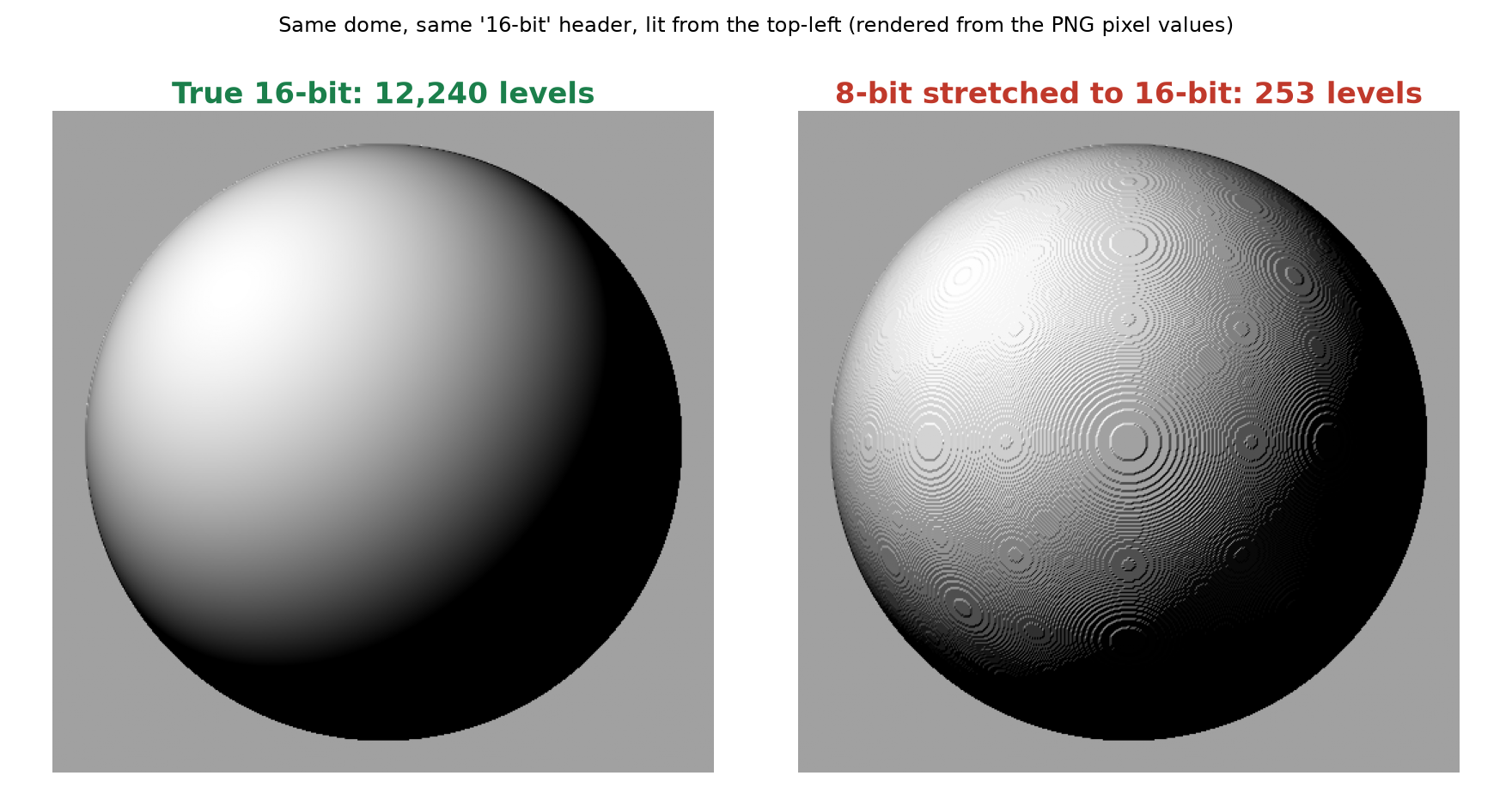
If a depth map lives in a git repo next to a LightBurn project or a CAM setup, a bad file is not just a local typo. It gets cloned, reused, and sent to a machine weeks later. Opening the PNG in a viewer will not catch it. A packed 8-bit file and a true 16-bit file look the same on a monitor.
I make Depth-Map.com, so I spend time on this failure mode: an exporter writes an 8-bit field into a 16-bit PNG container, the header says 16, and the surface still has at most 256 height steps. This post is not another manual inspection walkthrough. It is a small pipeline step you can drop into pre-commit or GitHub Actions, with exit codes and fixtures I actually ran.
What the build should reject
A 16-bit grayscale PNG can store 65,536 codes (0 to 65535). On Depth-Map.com the full scale is 10 mm, so a 3 mm relief uses about 19,661 of those codes. An 8-bit field stretched over the same 10 mm scale has about 77 usable codes in that 3 mm band. The step height is then:
- 8-bit or packed 16-bit, 10 mm scale:
3 mm / 77is about0.039 mmper terrace - true 16-bit, 10 mm scale:
10 mm / 65,536is about0.00015 mmper code
The first number is large enough to show as banding on polished metal. The second is below a typical fiber beam waist, so the file stops being the limit.
Many exporters produce the packed case by writing v * 257 for each 8-bit value v. That maps 0..255 onto 0..65535 (255 * 257 = 65,535) and leaves a fingerprint: at most 256 unique values, every one a multiple of 257. A second, quieter cheat is to copy the 8-bit codes into a 16-bit container with no scaling. The header is still 16-bit, but max is <= 255.
The pipeline should fail the job when any of these is true:
- The PNG
IHDRis not 16-bit grayscale (bit depth 16, color type 0). See the PNG 1.2 chunk specification for the field layout. - The file has 256 or fewer unique sample values.
- Every sample is a multiple of 257.
- The maximum sample is
<= 255.
A nearly flat plate can honestly have few levels, so a CI gate on unique count is a policy choice. For files that are supposed to be smooth reliefs, I treat <= 256 as a hard fail and let a person override with a skip comment if the scene is genuinely flat.
Do not trust Pillow mode I
Pillow's concept page lists mode I;16 (16-bit unsigned integer) and mode I (32-bit signed integer) as different things. A short script that accepts both as "16-bit grayscale" will misread files.
I checked this with Pillow 13.0.0 and NumPy 2.5.4. A true 16-bit grayscale PNG that I wrote from a uint16 array opened as mode I;16 with dtype=uint16. An 8-bit grayscale PNG opened as mode L with dtype=uint8. Calling Image.convert("I") on that 8-bit image produced mode I and dtype=int32, with values still in 0..255:
open(fixtures/plain_8bit.png) mode=L; after convert('I') mode=I dtype=int32 min=0 max=255 unique=256
Mode I is therefore not proof of 16-bit data. The checker below reads the IHDR bytes itself and only then looks at the sample distribution. If Pillow still reports mode I on a file that claims to be a 16-bit PNG, the script fails that file rather than recasting the 32-bit buffer as uint16.
A checker with exit codes
Save this as check_depth_png.py. Exit 0 means every file passed. Exit 1 means at least one file failed the checks. Exit 2 means a path was missing or was not a readable PNG.
#!/usr/bin/env python3
"""Fail a CI job when a 16-bit depth-map PNG holds packed 8-bit data."""

from __future__ import annotations

import argparse
import struct
import sys
from pathlib import Path

import numpy as np
from PIL import Image

PNG_SIG = b"\x89PNG\r\n\x1a\n"


def read_ihdr(path: Path) -> tuple[int, int, int, int]:
    data = path.read_bytes()
    if data[:8] != PNG_SIG:
        raise ValueError("not a PNG (signature mismatch)")
    length = struct.unpack(">I", data[8:12])[0]
    if data[12:16] != b"IHDR":
        raise ValueError("first chunk is not IHDR")
    if length < 13:
        raise ValueError("IHDR is too short")
    width, height, bit_depth, color_type = struct.unpack(">IIBB", data[16:26])
    return width, height, bit_depth, color_type


def inspect(path: Path) -> tuple[str, str]:
    try:
        width, height, bit_depth, color_type = read_ihdr(path)
    except Exception as exc:
        return "ERROR", f"{path}: {exc}"

    img = Image.open(path)
    arr = np.array(img).reshape(-1)
    unique = int(np.unique(arr).size)
    min_val = int(arr.min()) if arr.size else 0
    max_val = int(arr.max()) if arr.size else 0
    # Cast to int64 first: uint8 % 257 overflows in NumPy.
    multiples_of_257 = bool(arr.size and np.all(arr.astype(np.int64) % 257 == 0))

    header = (
        f"{path}: mode={img.mode} dtype={arr.dtype} "
        f"IHDR={width}x{height} bit_depth={bit_depth} color_type={color_type} "
        f"range={min_val}-{max_val} unique={unique} all_%257==0={multiples_of_257}"
    )

    reasons = []
    if bit_depth != 16 or color_type != 0:
        reasons.append(
            f"need 16-bit grayscale IHDR (bit depth 16, color type 0); "
            f"got bit_depth={bit_depth} color_type={color_type}"
        )
    if img.mode == "I":
        reasons.append(
            "Pillow mode 'I' is 32-bit integer, not 16-bit grayscale; "
            "an 8-bit image converted with Image.convert('I') also has this mode"
        )
    if max_val <= 255:
        reasons.append(f"max value {max_val} is <= 255 (8-bit range inside the container)")
    if unique <= 256:
        reasons.append(f"{unique} unique levels is <= 256")
    if multiples_of_257:
        reasons.append("every sample is a multiple of 257 (v * 257 packing fingerprint)")

    if reasons:
        return "FAIL", header + "\n  FAIL: " + "; ".join(reasons)
    return "PASS", header + "\n  PASS: 16-bit grayscale distribution looks real"


def main(argv: list[str]) -> int:
    parser = argparse.ArgumentParser(description=__doc__)
    parser.add_argument("paths", nargs="+", type=Path)
    args = parser.parse_args(argv)

    statuses = []
    for path in args.paths:
        if not path.is_file():
            print(f"{path}: ERROR: file not found")
            statuses.append("ERROR")
            continue
        status, message = inspect(path)
        print(message)
        statuses.append(status)

    if "ERROR" in statuses:
        return 2
    if "FAIL" in statuses:
        return 1
    return 0


if __name__ == "__main__":
    sys.exit(main(sys.argv[1:]))
I ran that exact logic (Pillow 13.0.0, NumPy 2.5.4, Python 3.13) against fixtures I generated, not against a downloaded product file.
Fixtures I generated, and the output I got
A 1024 x 64 linear ramp is enough to tell the cases apart. Image.fromarray on a uint16 array produced mode I;16 in this Pillow version; passing mode="I;16" explicitly raised ValueError: Invalid mode for data type, so the snippet below omits the mode argument.
import numpy as np
from PIL import Image

w, h = 1024, 64
x16 = np.linspace(0, 65535, w, dtype=np.uint16)
Image.fromarray(np.tile(x16, (h, 1))).save("true_ramp_16bit.png")

x8 = np.linspace(0, 255, w, dtype=np.uint8)
packed = x8.astype(np.uint16) * np.uint16(257)
Image.fromarray(np.tile(packed, (h, 1))).save("packed_257.png")

unscaled = x8.astype(np.uint16)
Image.fromarray(np.tile(unscaled, (h, 1))).save("unscaled_8_in_16.png")
Image.fromarray(np.tile(x8, (h, 1)), mode="L").save("plain_8bit.png")
Measured properties after a fresh Image.open and a raw IHDR read:
| File | Pillow mode | dtype | IHDR bit depth | unique levels | max | all values % 257 == 0 |
|---|---|---|---|---|---|---|
true_ramp_16bit.png |
I;16 |
uint16 |
16 | 1024 | 65535 | False |
packed_257.png |
I;16 |
uint16 |
16 | 256 | 65535 | True |
unscaled_8_in_16.png |
I;16 |
uint16 |
16 | 256 | 255 | False |
plain_8bit.png |
L |
uint8 |
8 | 256 | 255 | False |
The true ramp has 1024 unique codes because the image is 1024 pixels wide; it does not use all 65,536 values, and it should not be expected to. The packed file has a 16-bit header and a full 0..65535 range, which is why a file inspector that only reads IHDR calls it 16-bit.
Single-file runs of the checker, with the exit code from echo $?:
$ python3 check_depth_png.py fixtures/true_ramp_16bit.png
fixtures/true_ramp_16bit.png: mode=I;16 dtype=uint16 IHDR=1024x64 bit_depth=16 color_type=0 range=0-65535 unique=1024 all_%257==0=False
  PASS: 16-bit grayscale distribution looks real
# exit=0

$ python3 check_depth_png.py fixtures/packed_257.png
fixtures/packed_257.png: mode=I;16 dtype=uint16 IHDR=1024x64 bit_depth=16 color_type=0 range=0-65535 unique=256 all_%257==0=True
  FAIL: 256 unique levels is <= 256; every sample is a multiple of 257 (v * 257 packing fingerprint)
# exit=1

$ python3 check_depth_png.py fixtures/unscaled_8_in_16.png
fixtures/unscaled_8_in_16.png: mode=I;16 dtype=uint16 IHDR=1024x64 bit_depth=16 color_type=0 range=0-255 unique=256 all_%257==0=False
  FAIL: max value 255 is <= 255 (8-bit range inside the container); 256 unique levels is <= 256
# exit=1

$ python3 check_depth_png.py fixtures/plain_8bit.png
fixtures/plain_8bit.png: mode=L dtype=uint8 IHDR=1024x64 bit_depth=8 color_type=0 range=0-255 unique=256 all_%257==0=False
  FAIL: need 16-bit grayscale IHDR (bit depth 16, color type 0); got bit_depth=8 color_type=0; max value 255 is <= 255 (8-bit range inside the container); 256 unique levels is <= 256
# exit=1

$ python3 check_depth_png.py fixtures/does_not_exist.png
fixtures/does_not_exist.png: ERROR: file not found
# exit=2
A batch of the four fixtures returned exit 1, because any failed file fails the job. That is the behavior you want in CI.
One implementation note: I first wrote arr % 257 without a cast. On the 8-bit fixture NumPy raised OverflowError: Python integer 257 out of bounds for uint8. The published script casts to int64 first. Use the outputs above, not a guessed transcript.
Hook it to pre-commit and GitHub Actions
A local hook, in .pre-commit-config.yaml:
repos:
  - repo: local
    hooks:
      - id: check-depth-png
        name: Fail on packed 16-bit depth map PNGs
        entry: python3 check_depth_png.py
        language: system
        files: '(^|/)(depth|height|displacement).*\.png$'
        pass_filenames: true
Tighten the files regex to match how your repo names exports. Install Pillow and NumPy in the environment that runs the hook.
A GitHub Actions step that fails the job the same way:
name: Check depth map PNGs
on:
  pull_request:
  push:
    paths:
      - "**/*.png"
      - "check_depth_png.py"
jobs:
  depth-maps:
    runs-on: ubuntu-latest
    steps:
      - uses: actions/checkout@v4
      - uses: actions/setup-python@v5
        with:
          python-version: "3.13"
      - run: pip install pillow numpy
      - name: Reject packed or 8-bit depth maps
        run: |
          mapfile -t files < <(git ls-files '*.png')
          if [ ${#files[@]} -eq 0 ]; then
            echo "No PNG files in the repo."
            exit 0
          fi
          python3 check_depth_png.py "${files[@]}"
If you only want to scan a toolpaths/ or depthmaps/ folder, pass that glob instead of every PNG in the repo. Screenshots and 8-bit previews will otherwise fail the job on purpose.
I ran the script locally on the fixtures above. I did not run this workflow on GitHub.
When you are not in a repo
For a single file on a shop PC, the same checks are available in the browser with the 16-bit depth map checker on Depth-Map.com. The page says it decodes the PNG locally and does not upload the file. I still prefer the script in CI, because a browser tab is easy to skip.
If you already engrave brass or steel in LightBurn 3D Sliced mode, the practical reason to fail the build is in the LightBurn 3D Sliced starting values write-up: raising the pass count cannot invent gray levels that are not in the file.
The checker does not grade artistic quality, does not repair a packed file, and does not replace a corner test on the machine. Converting a packed PNG to 16-bit again will not restore the missing codes. Re-export from a pipeline that keeps a 16-bit buffer, then let CI decide whether that export is allowed into the job folder.
Comments
Join the discussionNo comments yet. Be the first to comment.